Smart 4K PoE Camera with ColorX True Full-Color Night Vision
4K 8MP Ultra HD Resolution for Clarity
ColorX Technology for True Color Night Vision
F1.0 Super Aperture Lens Captures More Light
Smart Person, Vehicle, and Animal Detection
Power Over Ethernet (PoE) for Easy Setup
IP67 Weatherproof for Sturdy Outdoor Protection
RM729.00–RM1,479.00Price range: RM729.00 through RM1,479.00
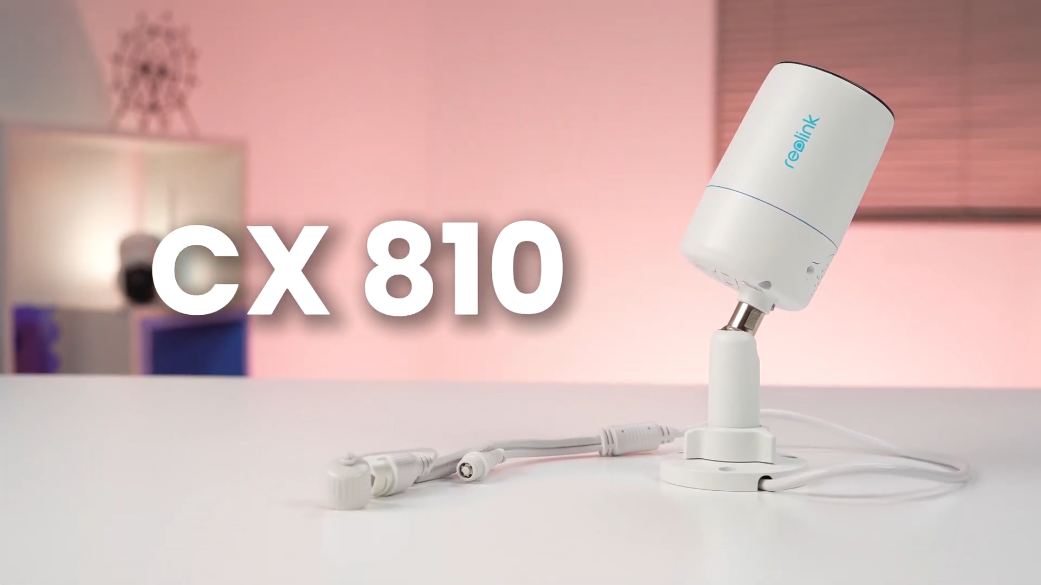
Reolink CX810
CX810 Video
6 Videos
Others Video
Disclaimer: The videos are intended for reference purposes only and are not guaranteed to be 100% accurate. Please refer to the actual product or contact us for verification.
Camera Overview, ColorX Technology & Physical Specifications
What is the Reolink CX810 security camera?
A: The Reolink CX810 is a standalone outdoor PoE (Power over Ethernet) IP security camera featuring 4K 8MP Ultra HD resolution, High Dynamic Range (HDR), ColorX true-color night vision technology, an ultra-large F1.0 super aperture, built-in warm spotlights, and smart AI motion detection for people, vehicles, and animals.
What is ColorX technology and how does the F1.0 aperture work on the CX810?
A: ColorX technology combines an advanced 1/1.8-inch CMOS sensor with an extra-large F1.0 super aperture lens that captures four times more light than a standard F2.0 lens. This allows the camera to deliver full true-color video at night in extremely low-light conditions without relying on harsh white light or traditional infrared illuminators.
What video resolution, frame rate, and field of view does the CX810 offer?
A: The CX810 records video at 4K Ultra HD resolution (3840x2160 pixels, 8 megapixels) at up to 25 frames per second (FPS). It features a fixed 4.0mm lens providing a field of view measuring 93.2 degrees horizontal, 48.2 degrees vertical, and 111.6 degrees diagonal.
What are the physical dimensions, weight, and weatherproof rating of the CX810?
A: The camera features a durable aluminum housing measuring 67 mm in diameter by 187 mm in length and weighs approximately 467g. It carries a heavy-duty IP67 weatherproof rating and operates in temperatures ranging from -10°C to 50°C (14°F to 126°F) and humidity levels between 10% and 90%.
What items are included in the box with the Reolink CX810?
A: The package includes:
Reolink CX810 Camera
1M Network Ethernet Cable
Waterproof Lid (For Ethernet cable connection)
Pack of Screws and Drywall Anchors
Mounting Hole Template
24-Hour Video Surveillance Sticker
Quick Start Guide
Night Vision, Audio & Video Settings
Does the Reolink CX810 have infrared (IR) night vision?
A: No, the CX810 does not utilize traditional black-and-white infrared (IR) LEDs. Instead, it relies on ColorX technology, its F1.0 aperture lens, and warm-toned spotlights to capture vivid full-color video even in pitch-black environments.
What are the specifications of the built-in spotlights on the CX810?
A: The camera is equipped with 4 adjustable warm spotlights (3000K warm white color temperature) delivering up to 400 Lumens at 3W total power, capable of illuminating scenes up to 15 meters (50 feet) away in total darkness.
Does the CX810 support two-way audio communication?
A: Yes, the camera features a built-in microphone and loud speaker, enabling clear two-way real-time voice communication through the Reolink App or Client software, as well as a custom audio siren to deter unwanted visitors.
What video compression formats and bitrates are supported?
A: The camera supports both H.265 and H.264 video compression formats. Mainstream frame rates range from 2fps to 25fps with bitrates from 1024Kbps to 8192Kbps (Default 6144Kbps). Substream frame rates range from 4fps to 15fps with bitrates from 64Kbps to 512Kbps (Default 256Kbps).
Does the CX810 support High Dynamic Range (HDR) and Time Lapse recording?
A: Yes, the CX810 includes built-in 4K HDR technology to balance bright high-contrast areas and dark shadows for crisp image detail. It also supports Time Lapse recording for capturing long-duration events like sunrises or construction work.
Power, Cabling & PoE Requirements
How is the Reolink CX810 powered?
A: The CX810 can be powered using Power over Ethernet (PoE) via a single network cable connected to a PoE switch or Reolink PoE NVR, or connected via an optional DC 12V/1A power adapter (Sold separately).
What PoE standards does the CX810 support, and what is its power consumption?
A: The camera supports the IEEE 802.3af active 48V PoE standard. Total power consumption is low, operating under 12 Watts.
Can I power the CX810 with a standard DC power adapter instead of PoE?
A: Yes, if PoE is not available on your router or switch, you can power the camera by plugging a DC 12V 1A power adapter into the DC power port located on the camera's tail cable while running an Ethernet cable to your router for data.
What connectors are located on the camera's tail cable?
A: The camera's tail cable branches into three separate connectors:
RJ45 Network Port: For Ethernet connection and PoE power.
DC Power Port: For optional 12V 1A power adapter input.
Reset Button: Waterproof button cover used to reset the camera to factory default settings.
Does the CX810 require a battery or solar panel?
A: No. The CX810 is a hardwired PoE IP security camera designed for reliable 24/7 wired power and network performance. It does not use rechargeable batteries or solar panels.
Network, ONVIF & Compatibility
Does the CX810 support ONVIF, RTSP, and third-party software like NVRs or NAS?
A: Yes, the CX810 supports standard network protocols including ONVIF, RTSP, RTMP, HTTPS, HTTP, and FTP, allowing seamless integration with third-party software like Synology Surveillance Station, Blue Iris, Home Assistant, and various third-party NVR systems.
What network protocols and web browsers are supported by the camera?
A: The camera supports protocols including HTTPS, SSL, TCP/IP, UDP, HTTP, IPv4, UPnP, RTSP, RTMP, ONVIF, SMTP, NTP, DHCP, DNS, DDNS, FTP, and P2P. You can view the camera directly through web browsers including Microsoft Edge, Google Chrome, Mozilla Firefox, and Apple Safari.

How many simultaneous user streams and user accounts are supported?
A: The camera supports up to 20 user accounts (1 admin account and 19 user accounts) and allows up to 12 simultaneous video streams (2 main streams and 10 sub streams).
What operating systems are compatible with Reolink software?
A: The Reolink App is compatible with mobile devices running iOS and Android, while the Reolink Client software supports Windows PC and Mac OS desktop computers.
Does the CX810 support WiFi or wireless connections?
A: No, the CX810 is a strictly wired PoE camera that requires a physical RJ45 Ethernet cable connection for data transmission and network access.
AI Smart Detection, Recording & Storage Options
What smart AI detection features are built into the CX810?
A: The camera features advanced onboard AI algorithms that accurately identify and distinguish between People, Vehicles, and Animals or Pets, minimizing false motion alarms caused by rain, wind, or shadows.
Does the CX810 support 24/7 continuous recording?
A: Yes. Unlike battery-powered cameras, the hardwired CX810 fully supports 24/7 continuous recording, scheduled timer recording, and motion-triggered event recording.
What local storage options and microSD card capacities are supported?
A: The camera features a waterproof onboard microSD card slot located behind a screwed plate on the aluminum body, supporting memory cards up to 512GB for local event or continuous storage.
Can the CX810 be connected to a Reolink PoE NVR?
A: Yes, the CX810 connects directly to Reolink PoE Network Video Recorders (NVRs) via a single Cat5e or Cat6 Ethernet cable for plug-and-play setup, centralized 24/7 recording, and expanded hard drive storage.
What alert notifications are triggered when motion is detected?
A: Upon detecting a motion event, the camera can illuminate its warm spotlights, sound its audio siren, send instant push notifications to your mobile phone, and dispatch automated email alert notifications with image snapshots.
Installation, Setup & Maintenance
How do I perform initial setup for the CX810 using the Reolink App?
A: Connect the camera to a PoE switch or router using an Ethernet cable, launch the Reolink App, tap the "+" icon in the upper right corner, scan the QR code located on the camera body or enter its 16-digit UID, set an administrator password, and name your camera.
How is the CX810 physically mounted and adjusted on a wall or ceiling?
A: Use the included mounting template to drill pilot holes, secure the metal mount base to the wall or ceiling using the included screws, loosen the adjustment knob on the security bracket counterclockwise, adjust the camera body to your desired viewing angle (360-degree rotation, 90-degree tilt), and turn the knob clockwise to lock it securely in place.
How do I protect the Ethernet connection from water and weather elements outdoors?
A: Thread the Ethernet cable through the included multi-piece waterproof lid assembly (Rubber O-ring, waterproof cap, and main housing) before crimping or connecting the RJ45 connector to the camera's network port to form a watertight seal against rain and moisture.
How do I perform a factory reset on the CX810 camera?
A: Unscrew the waterproof protective rubber cover on the tail cable connector to locate the physical reset button. Press and hold the reset button for more than 10 seconds while the camera is powered on until you hear a prompt or the camera reboots to factory default settings.
What warranty and technical support options come with the CX810?
A: The camera comes with a 2-year limited warranty when purchased through official or authorized channels, with technical resources and support tickets available via https://reolinkmalaysia.com.my/support.
Reviews
There are no reviews yet