Smart 4K Dual-Lens Wi-Fi Camera with Auto-Zoom Tracking
4K 8MP Dual-Lens with 6× Zoom
Auto-Zoom Tracking Follows Moving Targets
Smart Person, Vehicle, and Animal Detection
Wire-Free with Battery and Solar
Dual-Band WiFi for Stable Connection
Full Color Night Vision with Spotlights
RM789.00–RM1,977.00Price range: RM789.00 through RM1,977.00
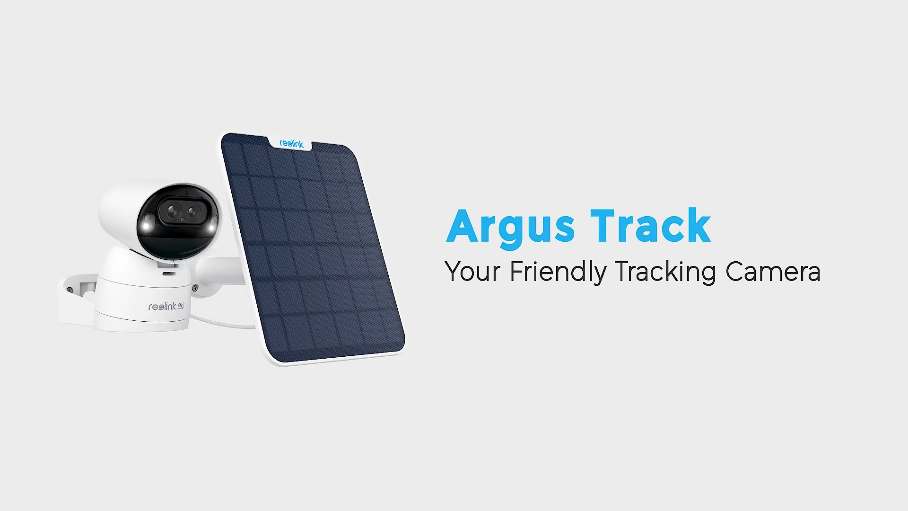
Reolink Argus Track
Argus Track Video
7 Videos
Solar Panel Video
Others Video
Disclaimer: The videos are intended for reference purposes only and are not guaranteed to be 100% accurate. Please refer to the actual product or contact us for verification.
Camera Overview, Dual-Lens & Physical Specifications
What is the Reolink Argus Track security camera?
A: The Reolink Argus Track is a wire-free outdoor WiFi security camera powered by a rechargeable battery or solar panel. It features dual-lens technology with 4K 8MP Ultra HD resolution, motorized 355-degree pan and 50-degree tilt coverage, 6X Hybrid Zoom, Dual View display, and AI smart auto-zoom tracking.
What is special about the dual-lens system and 6X Hybrid Zoom on the Argus Track?
A: The camera combines two fixed focal length lenses: a wide-angle lens for overview coverage and a telephoto lens for detailed close-ups. Together, they enable 6X Hybrid Zoom and provide a side-by-side Dual View stream in the app, showing both the full panoramic scene and the zoomed-in tracking view simultaneously.
What video resolution and field of view does each lens provide?
A: The wide-angle lens records at 4K 8MP Ultra HD (3840x2160 pixels at 15 fps) with a field of view measuring 105 degrees horizontal, 55 degrees vertical, and 123 degrees diagonal. The telephoto lens provides a close-up field of view measuring 43 degrees horizontal, 25 degrees vertical, and 49.5 degrees diagonal.
What motorized pan & tilt capabilities and preset points are supported?
A: The Argus Track features a motorized head that rotates up to 355 degrees horizontally and tilts up to 50 degrees vertically with configurable PT speed. It supports setting 1 guard position (Home orientation) and up to 32 preset points, along with a power-off memory function.
What are the physical dimensions, weight, and operating specs of the Argus Track?
A: The camera body measures 85 x 84 x 118 mm and weighs approximately 476g (Including the battery). It features a weatherproof housing operating in temperatures from -10°C to 55°C (14°F to 131°F) and humidity levels from 10% to 90%.
Video, Night Vision & Audio Performance
How does night vision work on the Argus Track, and what is its range?
A: The camera supports both infrared black-and-white night vision and spotlight-assisted color night vision. Its 2 infrared LEDs (850nm, 2.15W) with an auto-switching IR-cut filter provide night visibility up to 30 meters (100 feet). Its built-in white spotlights illuminate scenes up to 15 meters (50 feet) for full-color night video.
What are the specifications of the built-in spotlights?
A: The Argus Track is equipped with 2 white spotlights delivering a light output of up to 295 Lumens at a color temperature of 6000K, with adjustable brightness levels available in the Reolink App.
Does the camera support two-way audio and voice alerts?
A: Yes, the Argus Track includes a built-in microphone and speaker, enabling real-time two-way audio communication as well as a customizable audio siren to deter intruders.
What video compression formats and bitrates are supported?
A: The camera supports both H.264 and H.265 video compression formats. Mainstream bitrates range from 1024Kbps to 4096Kbps (Default 2048Kbps), while substream bitrates range from 64Kbps to 672Kbps (Default 672Kbps).
Does the Argus Track support Time Lapse video recording?
A: Yes, the Argus Track includes a built-in Time Lapse feature, allowing you to capture long-duration events (Such as sunsets, blooming flowers, or construction progress) and view them in compressed video clips.
Power, Battery & Solar Management
What is the battery capacity of the Argus Track, and is it removable?
A: The camera is equipped with an integrated 4800mAh rechargeable battery. The battery is built inside the device housing and is non-removable.
How do I charge the Argus Track, and can I use solar power?
A: You can charge the camera by connecting a standard 5V/2A DC power adapter to its USB-C port, or connect it directly to an official Reolink Solar Panel for continuous outdoor trickle charging.
How do the LED indicators show the charging status?
A: Located near the charging port, the status LED displays:
Solid Orange LED: Battery is actively charging.
Solid Green LED: Battery is fully charged.
Does the Argus Track support 24/7 continuous recording?
A: No. As a battery-powered camera, the Argus Track is engineered specifically for motion-triggered event recording and live viewing to preserve battery charge and lifespan.
What battery safety guidelines and temperature ranges should be followed?
A: Always charge the battery within temperature ranges of 0°C to 45°C (32°F to 113°F) and operate the camera between -10°C and 55°C (14°F to 131°F). Keep the USB-C charging port dry, clean, and covered with its rubber plug when not actively charging.
Network, WiFi & Software Compatibility
Does the Argus Track support dual-band WiFi networks?
A: Yes, the camera features dual-band WiFi supporting both 2.4GHz and 5GHz wireless frequencies following the IEEE 802.11 a/b/g/n standards. Connecting to a 5GHz network is recommended for optimal 4K video streaming performance.
What wireless security encryption standards and protocols are supported?
A: The Argus Track supports WPA-PSK and WPA2-PSK wireless encryption protocols, along with standard network protocols including SSL, TCP/IP, UDP, UPNP, SMTP, NTP, and P2P.
What do the status LED light colors mean on the Argus Track?
A: The device status LED indicates network states as follows:
Solid Red: WiFi connection failed.
Solid Blue: WiFi connection succeeded.
Blinking: Standby mode.
Solid Light On: Active working status.
How many simultaneous user streams are supported by the camera?
A: The Argus Track supports up to 12 simultaneous video streams in total (2 main streams and 10 sub streams).
What operating systems are compatible with Reolink software?
A: The Reolink App is available for mobile devices running iOS and Android, while the Reolink Client software supports Windows PC and Mac OS desktop computers.
Auto-Tracking, AI Detection & Storage
How does auto-zoom tracking work on the Argus Track?
A: When a person, vehicle, or animal triggers the detection sensor, the camera automatically pans and tilts to follow the moving target across its field of view, utilizing its telephoto lens to dynamically zoom in on the target while keeping the wide overview in frame.
What smart AI detection features and PIR sensor range does the camera offer?
A: The Argus Track combines Passive Infrared (PIR) thermal sensing with AI image algorithms to identify and distinguish specifically between People, Vehicles, and Animals. The PIR sensor features a 120-degree horizontal detection angle and an adjustable range extending up to 11 meters (36 feet).
What local storage capacity is supported by the onboard microSD slot?
A: The camera features a built-in microSD card slot that supports memory cards up to 512GB in capacity for local event video storage.
Does the Argus Track support cloud storage and smart home platforms?
A: Yes, it supports Reolink Cloud storage for off-site backup (Available in select countries) and is compatible with smart home voice platforms like Google Assistant.
What alert options are triggered when motion is detected?
A: Upon detecting motion events, the camera can sound its customizable audio siren, illuminate its white spotlights, and dispatch instant push notifications and email alerts to your phone.
Installation, Setup & Troubleshooting
What is the recommended mounting height and orientation for optimal detection?
A: Install the camera 2 to 3 meters (7 to 10 feet) above the ground and angle it downward so that side-to-side motion crosses sideways across the camera's field of view. Avoid pointing the PIR sensor directly toward vertical head-on movement.
Why is the mounting bracket designed with a 10-degree inclination?
A: The mounting bracket features a built-in 10-degree downward tilt angle specifically engineered to minimize monitoring blind spots directly beneath the camera base when wall-mounted.
What mounting options are included in the box for installing the Argus Track?
A: The box includes a versatile mounting bracket along with a pack of screws and drywall anchors for wall surfaces, as well as a loop strap for securing the bracket to trees, poles, or posts.
How do I turn on, power off, or factory reset the Argus Track?
A: Uncover the rubber protective cover on the back of the camera head to access physical controls:
Power On or Off: Flip the dedicated power toggle switch.
Factory Reset: Insert the included reset needle into the reset hole and press for more than 5 seconds until you hear a voice prompt.
What troubleshooting steps should I take if the camera fails to turn on or scan QR codes?
A: If the camera won't turn on, ensure the power switch is flipped ON and charge the unit with a 5V/2A adapter. If scanning the QR code fails, remove any protective lens film, clean the dual lenses with a dry cloth, adjust the scanning distance between 20-30 cm, and scan under adequate lighting.





Reviews
There are no reviews yet