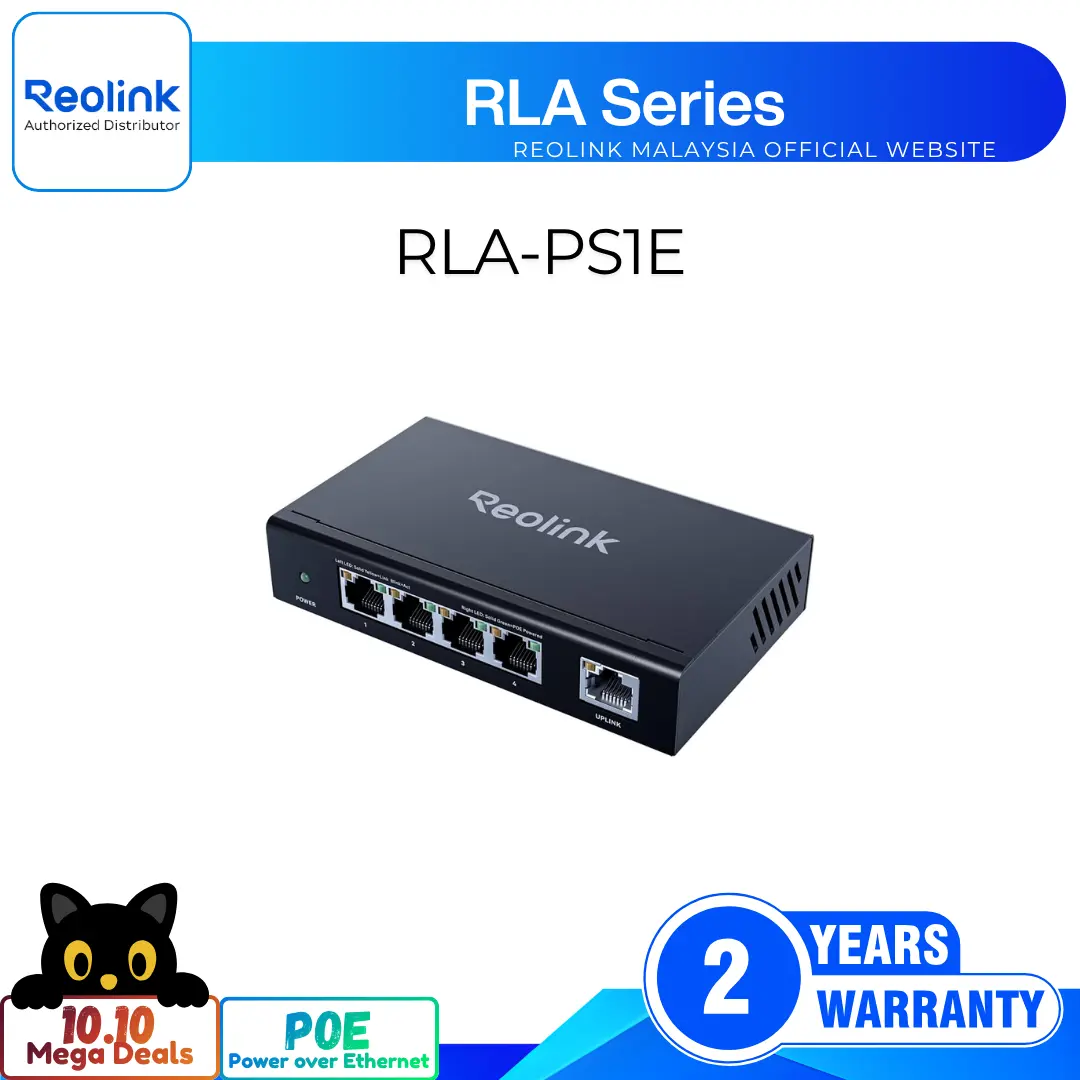
120W High-Power 10-Port PoE Switch with 8 PoE+ Ports
8 PoE+ Ports with 120W Total Budget
2 Gigabit Ethernet Uplink Ports for Speed
Delivers Up to 30W Per PoE Port
Intelligent Power Management Prevents System Overload
Auto-Detects Devices to Protect Non-PoE Equipment
4KV Surge Protection Against Lightning Strikes
RM499.00Original price was: RM499.00.RM329.00Current price is: RM329.00.
Reolink RLA-PS1
RLA-PS1 Video
4 Videos
Others Video
Disclaimer: The videos are intended for reference purposes only and are not guaranteed to be 100% accurate. Please refer to the actual product or contact us for verification.
What is the Reolink RLA-PS1 and what is its primary function?
A: The Reolink RLA-PS1 is a high-performance 10-port Power over Ethernet (PoE) network switch. It functions as a centralized power and data hub designed to supply electrical power and high-speed network connectivity to PoE-enabled IP security cameras, access points, and other network hardware using standard Ethernet cables.
How many ports does the RLA-PS1 feature and what are their speed ratings?
A: The RLA-PS1 features 10 network ports in total:
8 Downlink PoE+ Ports: 10/100 Mbps RJ45 ports that deliver active Power over Ethernet power and network data to connected devices.
2 Uplink Ports: 100/1000 Mbps (Gigabit) RJ45 Ethernet ports dedicated to connecting the switch to your local area network router, NVR (Network Video Recorder), or core switch.
What items are included in the package box when purchasing the Reolink RLA-PS1?
A: The standard package includes:
Reolink RLA-PS1 PoE Switch
DC 52V 2.3A Power Adapter (120W)
Cotton Mats / Rubber Feet
Mounting Hole Template
Pack of Screws and Wall Anchors
Operational Instructions / Quick Start Guide
What are the physical dimensions, weight, and build of the RLA-PS1?
A:
Dimensions: 189.6 mm width x 106.6 mm depth x 25.6 mm height (7.46 in x 4.20 in x 1.01 in)
Weight: 457.9 grams (1.01 lbs)
Chassis: Compact, durable metal housing designed for efficient passive heat dissipation.
What warranty coverage and technical support options are provided for the RLA-PS1?
A: The Reolink RLA-PS1 includes a 2-year limited warranty valid when purchased from the official Reolink store or authorized resellers. Official technical support and assistance can be accessed online at https://reolinkmalaysia.com.my/support.
Power over Ethernet (PoE), Power Budget & Standards
What is the total PoE power budget of the Reolink RLA-PS1?
A: The RLA-PS1 delivers a total PoE power budget of 120 Watts across its 8 downlink PoE+ ports, providing ample power to run multiple high-resolution IP cameras, spotlights, or pan-tilt devices simultaneously.
What is the maximum power output supplied per PoE port?
A: Each individual downlink PoE+ port can deliver a maximum output power of up to 30 Watts, adhering to high-power IEEE 802.3at (PoE+) specifications.
Which IEEE Power over Ethernet standards are supported by the switch?
A: The RLA-PS1 supports active IEEE 802.3af (PoE) and IEEE 802.3at (PoE+) standards. It automatically detects connected PoE devices and negotiates the exact voltage and power required for safe operation.
What type of power adapter is required to operate the RLA-PS1?
A: The switch is powered by an included external DC 52V, 2.3A (120W) power adapter operating on standard household AC 100V-240V power lines.
What happens if the total power draw of connected devices exceeds the 120W power budget?
A: The switch features intelligent power management circuitry. If the combined power draw of connected devices approaches or exceeds 120W, the switch prioritizes power delivery to lower-numbered ports (Port 1 to Port 8) to prevent overload and maintain system stability.
Network Connections, Uplink Ports & Camera Integration
What are the two Gigabit Uplink ports on the RLA-PS1 used for?
A: The two 100/1000 Mbps Gigabit Ethernet uplink ports transmit aggregated video traffic from all connected cameras to your core local network. One uplink port typically connects directly to your home or office WiFi router, while the second uplink port can connect directly to a Reolink NVR, computer, or secondary network switch.
Can the RLA-PS1 be connected to non-PoE network devices like routers or NVRs?
A: Yes. The two Gigabit Uplink ports are non-PoE data ports safely designed for router and NVR connections. Additionally, the 8 downlink PoE ports feature auto-sensing technology that safely disables power output when connected to non-PoE network equipment.
Is the RLA-PS1 compatible with all Reolink PoE cameras?
A: Yes, the RLA-PS1 is fully compatible with all Reolink PoE IP camera models, including 4MP, 5MP, 8MP (4K), 12MP, and 16MP bullet, dome, pan-tilt, fisheye, and dual-lens camera series.
Does the Reolink RLA-PS1 require initial app configuration or software setup?
A: No. The RLA-PS1 is an unmanaged plug-and-play network switch. It operates automatically upon connecting power and network cables without requiring IP address configuration, driver installations, or mobile app provisioning.
Can third-party ONVIF or standard IP PoE cameras be powered by the RLA-PS1?
A: Yes. Any standard IP camera or network device that complies with IEEE 802.3af or IEEE 802.3at PoE/PoE+ standards can be powered and networked through the RLA-PS1.
Installation Options, Mounting & Hardware Layout
What mounting and placement options are supported for installing the RLA-PS1?
A: The RLA-PS1 supports two primary installation methods:
Desktop / Tabletop Installation: Place on any flat surface using the provided self-adhesive cotton mats.
Wall Mounting: Mount vertically onto a wall using the provided screws, wall anchors, and mounting hole template.
How do you install the RLA-PS1 on a flat table or desktop?
A: Peel off the backing paper from the 4 provided cotton mats / rubber pads and attach them securely to the four corners on the underside of the switch chassis. Place the switch flat on a clean, stable surface with adequate surrounding airflow.
How do you mount the Reolink RLA-PS1 onto a wall?
A:
Position the included mounting template on the desired wall surface and mark the screw hole locations.
Drill holes into the wall based on the template marks. Insert plastic wall anchors if installing on drywall or masonry.
Drive the screws into the anchors, leaving a small gap between the screw head and the wall.
Align the keyhole slots on the back/bottom of the switch chassis over the screw heads and slide the unit down to lock it in place.
What is the purpose of the grounding screw on the rear panel of the chassis?
A: The rear grounding screw terminal allows the metal chassis to be connected to an earth ground wire. Grounding protects the switch and connected outdoor cameras against electrostatic discharge (ESD) and electrical surges caused by nearby lightning strikes.
Where are the physical ports, DC power jack, and LED indicators located on the switch?
A:
Front Panel: Power LED Indicator, 8 x 10/100 Mbps Downlink PoE+ RJ45 Ports (with link/activity LEDs), and 2 x Gigabit Uplink RJ45 Ports (with link/activity LEDs).
Rear Panel: Grounding Terminal Screw and DC 52V Power Input Port.
What are the operational temperature and humidity limits for the RLA-PS1?
A:
Operating Temperature: -10°C to +45°C (14°F to 113°F)
Operating Humidity: 10% to 90% RH (Non-condensing)
Is the Reolink RLA-PS1 weatherproof or suitable for outdoor installation?
A: No. The RLA-PS1 is strictly an indoor unmanaged switch without an IP weatherproof rating. It must be installed indoors inside climate-controlled rooms, equipment closets, or weatherproof junction enclosures.
What safety precautions should be taken when setting up power and cabling?
A:
Do not expose the switch or power adapter to water, rain, or excessive moisture.
Keep the switch away from direct heat sources, radiators, and direct sunlight.
Ensure the ventilation slots on the side panels remain unblocked for proper heat dissipation.
Keep small mounting hardware, plastic bags, and cords out of reach of children to prevent choking hazards.
What regulatory compliance certifications does the RLA-PS1 hold?
A: The RLA-PS1 complies with global electronics standards including FCC Part 15 Class B, Industry Canada ISED ICES-003, CE (European Conformity), UKCA (UK Conformity Assessed), and RoHS environmental standards.
How should the RLA-PS1 be safely recycled or disposed of at the end of its product life?
A: Do not dispose of the switch with general household waste. Recycle the unit through designated electrical and electronic equipment (WEEE) recycling collection facilities in accordance with local environmental laws.
LED Status Indicators, Troubleshooting & Maintenance
What do the LED indicators on the front panel of the RLA-PS1 signify?
A:
Power LED (Solid Green): Switch is powered on and receiving DC 52V current correctly.
Power LED (Off): Switch is turned off, unplugged, or experiencing power supply failure.
Port Link/Act LED (Solid Green): A valid network device is connected to the port.
Port Link/Act LED (Flashing Green): Data is actively transmitting across the port.
Port Link/Act LED (Off): No device is connected or cable connection failed.
What troubleshooting steps should I take if the Power LED fails to light up?
A:
Verify that the DC power plug is firmly inserted into the rear DC port of the switch.
Ensure the power adapter is plugged into a working AC wall outlet.
Test the wall outlet using another electronic device to confirm live power.
Test the switch with another compatible DC 52V power adapter or contact Reolink Support at htttps://reolinkmalaysia.com.my/support.
What should I do if a connected PoE camera fails to power on or stream video?
A:
Verify that the Ethernet cable is securely latched into both the camera port and the switch PoE+ port.
Test the camera using a different Ethernet cable (Cat5e or Cat6 recommended).
Connect the camera to a different PoE+ port on the switch.
Ensure total system power draw has not exceeded the 120W budget limit.
What steps should be taken if network transmission is slow or dropping connections?
A:
Ensure your network cables do not exceed the maximum recommended Ethernet length of 100 meters (328 feet).
Verify that network cable connectors (RJ45 plugs) are undamaged and properly crimped.
Ensure the uplink port is connected to a Gigabit LAN port on your router/NVR.
Inspect cables for physical kinks, sharp bends, or proximity to high-voltage electrical wiring causing interference.
How do you clean and maintain the RLA-PS1 chassis for optimal long-term operation?
A: Power off and unplug the switch before cleaning. Wipe the outer metal casing with a soft, clean, dry cloth to remove accumulated dust. Do not use liquid cleaners, aerosol sprays, or chemical solvents. Regularly inspect ventilation holes to keep them clear of dust obstructions.
Reviews
There are no reviews yet