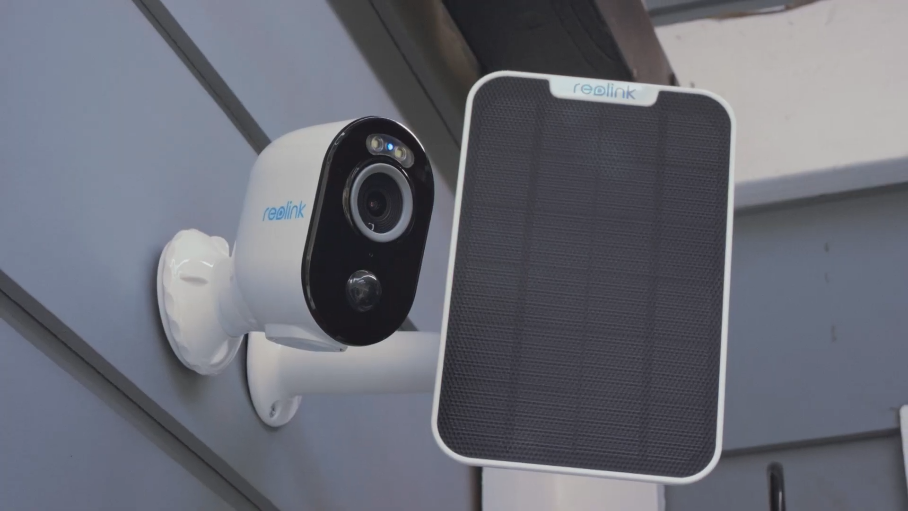
5MP Wire-Free Battery Camera with Spotlight & Dual-Band WiFi
2K+ 5MP Super HD Resolution for Clarity
Wire-Free with Battery and Solar Power Support
Dual-Band WiFi for Fast, Stable Connection
Smart Person, Vehicle, and Animal Detection
Full-Color Night Vision with Motion Spotlights
Two-Way Audio with Built-In Security Siren
RM388.00–RM1,576.00Price range: RM388.00 through RM1,576.00
Reolink Argus 3 Pro
Argus 3 Pro Video
9 Videos
Solar Panel Video
Others Video
Disclaimer: The videos are intended for reference purposes only and are not guaranteed to be 100% accurate. Please refer to the actual product or contact us for verification.
What is included in the box with the Reolink Argus 3 Pro?
A: The standard package includes:
Reolink Argus 3 Pro Camera
Security Bracket
Stand Bracket (For tabletop or surface placement)
Strap (For tree or post mounting)
USB Charging Cable
Reset Needle
Quick Start Guide or Operational Instructions
Mounting Template
Pack of Screws & Drywall Anchors
Surveillance Sign or Sticker
What is the video resolution, lens aperture, and field of view?
A: The camera captures 2K+ 5MP Super HD video at 2880 × 1620 resolution at up to 15 FPS (H.264 or H.265 video compression). Its optical specifications include:
Image Sensor: 1/2.7" CMOS sensor with an f = 2.8mm, F = 1.6 lens
Field of View: Horizontal: 105°, Vertical: 55°
What is the weatherproofing rating, dimensions, and weight of the camera?
A: The camera features an IP65 weatherproof rating, measures 121 × 90 × 56 mm, and weighs 330g (Without bracket). Its operating temperature range spans from -10°C to 55°C (14°F to 131°F), with working humidity between 20% and 85%.
Does the Reolink Argus 3 Pro support continuous 24/7 recording?
A: No. As a battery-powered WiFi camera, it is designed for motion-triggered recording, scheduled motion recording, and on-demand live view. It automatically wakes up when motion is detected by its PIR sensor or when accessed remotely via the Reolink App or Client to conserve battery power.

What software and smart home platforms support the Argus 3 Pro?
A: You can view and manage the camera through:
Mobile: Reolink App (iOS and Android)
Desktop: Reolink Client (Windows and macOS)
Smart Home: Google Assistant
Hub System: Compatible with the Reolink Home Hub
Battery, Power & Solar Charging
What is the battery specification and charging interface type?
A: The camera is powered by an internal 5200mAh rechargeable lithium battery. Recharging is performed through the USB Type-C port located on the back of the camera body.
Is the camera compatible with solar charging?
A: Yes, the Argus 3 Pro is fully compatible with the Reolink Solar Panel. Connecting a Reolink solar panel to the USB Type-C port provides continuous trickle charging under direct sunlight, eliminating the need for manual recharging. Third-party solar panels are not supported.
What temperature limits must be observed when charging and operating the battery?
A: The battery must only be charged in ambient temperatures between 0°C and 45°C (32°F to 113°F). Do not attempt to charge the device in freezing conditions. Operating or discharging temperatures range from -10°C to 55°C (14°F to 131°F).
How do I check the battery charging status via the LED light?
A: Located near the USB Type-C port under the protective rubber cover:
Orange LED: Battery charging is in progress.
Green LED: Battery is fully charged.
Why is closing the rubber plug over the charging port essential?
A: Pressing the rubber cover firmly flush over the USB charging port seals the camera enclosure to preserve its IP65 weatherproof seal, keeping out rainwater, ambient moisture (20% to 85%), and dust from damaging internal electronics.
WiFi Setup & Network Connectivity
What WiFi frequency bands and security standards are supported?
A: The Argus 3 Pro supports Dual-Band WiFi (2.4GHz and 5GHz) operating an IEEE 802.11 a/b/g/n standards with WPA-PSK/WPA2-PSK security encryption. Connecting to 5GHz WiFi is recommended for higher data speeds and smoother video streaming.
Does the Argus 3 Pro support 3G or 4G cellular connections?
A: No, the Argus 3 Pro is a WiFi security camera and does not contain a 3G or 4G LTE cellular modem or SIM card slot. It requires an active 2.4GHz or 5GHz WiFi network connection to communicate with the router.
How do I complete initial setup on the Reolink App?
A:
Download and open the Reolink App.
Slide the camera's physical Power Switch to ON (You will hear a startup tone and voice prompt).
Tap the "+" button in the top-right corner of the app and scan the QR code on the back of the camera.
Select WiFi Not Configured, enter your local WiFi SSID and password, then tap Scan Now.
Hold your smartphone screen showing the generated QR code approximately 20cm (8 inches) in front of the camera lens until it beeps.
Create a device password and name your camera to complete initialization.
How many simultaneous user streams are supported?
A: The camera supports up to 12 simultaneous video streams (2 main streams and 10 sub-streams).
What should I check if the camera fails to connect to the router during setup?
A:
Verify that you entered the correct WiFi network password.
Move the camera closer to your WiFi router during initialization.
Set your router's WiFi encryption mode to WPA2/WPA.
Ensure your WiFi SSID is within 31 characters and the password is within 64 standard keyboard characters.
Installation, Mounting & Placement
What physical mounting methods are supported out of the box?
A: The package includes options for three distinct installation methods:
Wall Mounting (Using the security bracket base and screws)
Strap Mounting (Using the loop strap wrapped around a tree stem or post)
Tabletop or Indoor Surface Placement (Using the stand bracket)
How do I mount the Argus 3 Pro to a wall using the security bracket?
A:
Rotate counterclockwise to separate the base from the security mount ball joint.
Drill holes using the included mounting template and insert drywall anchors if mounting into hard masonry or brick.
Screw the mount base tightly to the wall using the long screws provided.
Attach the other part of the security mount back onto the base.
Screw the camera onto the mount thread, adjust to your desired field of view, and turn the upper locking ring clockwise to tighten.
How do I place the camera on an indoor surface or attach it to a tree?
A:
Indoor Surface: Slot the camera into the U-shaped stand bracket and place it on a flat surface (E.g., bookshelf). Adjust the viewing angle by tilting the camera forward or backward inside the bracket.
Tree or Post: Thread the included loop strap through the slot at the bottom of the security bracket, wrap it tightly around a tree trunk, and buckle it securely.
What is the recommended height and orientation for optimal PIR detection?
A: Mount the camera 2 to 3 meters (7–10 feet) above the ground, angled slightly downward. Position the camera so expected target movement crosses laterally (Side-to-side) across the field of view rather than moving straight toward or away from the PIR sensor.
How do I adjust the camera angle on the security bracket after installation?
A: Loosen the upper locking collar on the security mount by turning it counterclockwise, re-orient the camera body to the desired viewing angle, and then re-tighten the collar clockwise to lock it firmly in place.
Night Vision, Smart AI Detection & Siren
What night vision modes are supported on the Reolink Argus 3 Pro?
A: The camera supports dual night vision modes:
Infrared Night Vision: 6 IR LEDs (0.8W, 850nm) deliver clear black-and-white video up to 10 meters (33 feet) in complete darkness.
Color Night Vision: 2 built-in spotlights (2W, 6500K, 230 Lumens) illuminate low-light scenes in full color when motion is detected or toggled manually.
How do the built-in spotlights and siren function?
A: The spotlights automatically switch on when motion is triggered in ambient darkness or under faint moonlight or starlight. Combined with the built-in speaker, you can configure an automated audio siren or custom voice alert to deter intruders when smart motion events are detected.
What Smart AI Detection capabilities are featured?
A: Onboard AI algorithms analyze footage locally to differentiate between:
Person Detection
Vehicle Detection
Animal Detection
PIR Motion Detection
What is the detection range and angle of the built-in PIR motion sensor?
A: The built-in PIR motion sensor features a 100° horizontal detection angle and senses movement up to 10 meters (33 feet) away.
Does the Argus 3 Pro support Time-Lapse recording?
A: Yes, the Argus 3 Pro supports custom Time-Lapse video creation managed directly within the Reolink App.
Storage, Safety & Troubleshooting
What local storage options are supported and where is the slot located?
A: Unplug the rubber cover on the side or bottom of the camera body to access the microSD card slot. The camera supports microSD cards up to 512GB (Sold separately) formatted in FAT32 or exFAT.
Does the camera support two-way real-time audio and Reolink Cloud?
A: Yes, it features a built-in microphone and speaker for real-time Two-Way Audio communication through the app. It also supports Reolink Cloud storage for offsite motion event backup (Cloud availability depends on region).
How do I power on, power off, or factory reset the Argus 3 Pro?
A: Access the control panel under the rubber cover:
Power On/Off: Slide the toggle Power Switch to turn the camera ON or OFF.
Factory Reset: Insert the included reset needle into the reset hole and press and hold for more than 5 seconds until you hear a prompt tone confirming the reset.
What should I do if the camera fails to scan the QR code on my smartphone screen?
A:
Peel off the protective plastic film from the camera lens.
Clean the camera lens with a soft, dry tissue.
Adjust the distance between your smartphone screen and the camera lens to approximately 20cm (8 inches) so the lens can focus.
Increase your smartphone screen brightness to maximum or scan under adequate room lighting.
What should I do if the camera will not power on?
A:
Ensure the physical power switch is set to the ON position.
Connect the camera to a DC 5V/2A power adapter using a USB cable.
Check the battery charging LED under the rear rubber cover or wait until it turns solid Green (Indicating a full charge).
If the device still fails to power on, contact Reolink Technical Support at https://reolinkmalaysia.com.my/support.
Argus 3 Pro (5MP): With 6W Solar Panel
Storage Capacity: 128GB
Items received in good condition and appropriate packaging. Never try the solar panel before, first time buying it to sew how good a total wireless installation will look like… 👍👍👍
Argus_3_ProLazadaReolink
(0)(0)
Rated 5 out of 5
Wei Ming Wong [From Lazada Reolink] –
Argus 3 Pro (5MP): With 6W Solar Panel
Storage Capacity: 128GB
Item received in good condition, the price is attractive during 9.9 promotion. First time buying the solar panel, never try it before… hopefully it can fulfill the outdoor and wireless deployment. And thanks for the free gift…👍👍👍
Wei Ming Wong [From Lazada Reolink] –
Argus 3 Pro (5MP): With 6W Solar Panel
Storage Capacity: 128GB
Items received in good condition and appropriate packaging. Never try the solar panel before, first time buying it to sew how good a total wireless installation will look like… 👍👍👍
Wei Ming Wong [From Lazada Reolink] –
Argus 3 Pro (5MP): With 6W Solar Panel
Storage Capacity: 128GB
Item received in good condition, the price is attractive during 9.9 promotion. First time buying the solar panel, never try it before… hopefully it can fulfill the outdoor and wireless deployment. And thanks for the free gift…👍👍👍
Ting Huong Yong [From Lazada Reolink] –
Argus 3 Pro: No Solar Panel
Memory: 128GB
Ting Huong Yong [From Lazada Reolink] –
Argus 3 Pro: No Solar Panel
Memory: 128GB
Nicole Foo [From Lazada Reolink] –
Argus 3 Pro: With 6W Solar Panel
Memory: 256GB
Armando Spagnolo [From Lazada Reolink] –
Argus 3 Pro: With 6W Solar Panel
Memory: 64GB
Meru.Jaya [From Lazada Reolink] –
Argus 3 Pro: With 6W Solar Panel
Memory: 64GB
Nafisah Yahya [From Lazada Reolink] –
Argus 3 Pro: No Solar Panel
Memory: 32GB
Very fast delivery. Thank you.
Sharron Lu [From Lazada Reolink] –
Argus 3 Pro: With Solar Panel
Memory: 128GB
Adibima [From Lazada Reolink] –
Argus 3 Pro: With Solar Panel
Memory: 128GB