RM499.00Original price was: RM499.00.RM299.00Current price is: RM299.00.
Reolink RLA-PS1E
RLA-PS1E Video
4 Videos
Others Video
Disclaimer: The videos are intended for reference purposes only and are not guaranteed to be 100% accurate. Please refer to the actual product or contact us for verification.
What is the Reolink RLA-PS1E and what is its primary function?
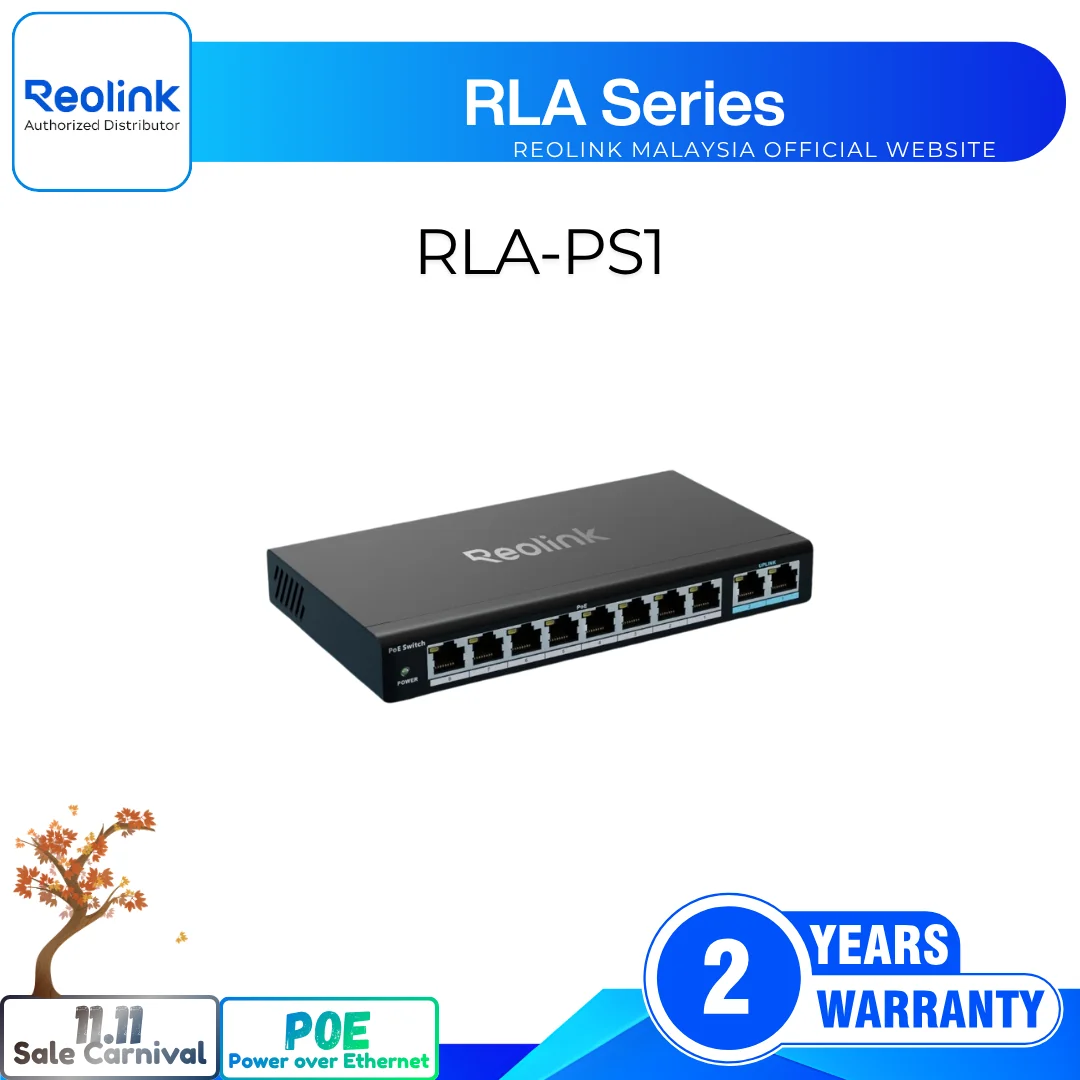
A: The Reolink RLA-PS1E is a compact 5-port Gigabit Power over Ethernet (PoE) network switch. It functions as a centralized power and data distribution hub designed to supply electrical current and high-speed network connectivity to PoE-enabled IP security cameras, access points, and other network hardware using standard Ethernet cables.
How many ports does the RLA-PS1E feature and what are their speed ratings?
A: The RLA-PS1E features 5 Gigabit Ethernet ports in total:
4 Downlink PoE+ Ports: 10/100/1000 Mbps RJ45 ports that deliver active Power over Ethernet power and high-speed network data to connected devices.
1 Uplink Port: 10/100/1000 Mbps (Gigabit) RJ45 Ethernet port dedicated to connecting the switch to your local area network router, NVR (Network Video Recorder), or primary network switch.
What items are included in the package box when purchasing the Reolink RLA-PS1E?
A: The standard package includes:
Reolink RLA-PS1E PoE Switch
DC 52V 1.25A Power Adapter (65W)
Cotton Mats / Rubber Feet
Mounting Hole Template
Pack of Screws and Wall Anchors
Operational Instructions / Quick Start Guide
What are the physical dimensions, weight, and build quality of the RLA-PS1E?
A:
Dimensions: 125.5 mm width x 76.8 mm depth x 25.5 mm height (4.94 in x 3.02 in x 1.00 in)
Weight: 234 grams (0.52 lbs)
Chassis: Compact, durable metal housing designed for fanless passive heat dissipation.
What warranty coverage and technical support options are provided for the RLA-PS1E?
A: The Reolink RLA-PS1E includes a 2-year limited warranty valid when purchased from the official Reolink store or authorized resellers. Official technical support and online assistance can be accessed at https://reolinkmalaysia.com.my/support.
Power over Ethernet (PoE), Power Budget & Standards
What is the total PoE power budget of the Reolink RLA-PS1E?
A: The RLA-PS1E delivers a total PoE power budget of 65 Watts across its 4 downlink PoE+ ports, providing stable power to run multiple high-resolution IP cameras, pan-tilt units, or spotlights simultaneously.
What is the maximum power output supplied per PoE port?
A: Each individual downlink PoE+ port can deliver a maximum output power of up to 30 Watts, adhering to high-power IEEE 802.3at (PoE+) specifications.
Which IEEE Power over Ethernet standards are supported by the switch?
A: The RLA-PS1E supports active IEEE 802.3af (PoE) and IEEE 802.3at (PoE+) standards. It automatically detects connected PoE devices and negotiates the exact voltage and power required for safe operation.
What type of power adapter is required to operate the RLA-PS1E?
A: The switch is powered by an included external DC 52V, 1.25A (65W) power adapter operating on standard household AC 100V-240V power lines.
How does intelligent power management work if power consumption exceeds the 65W budget?
A: The switch features intelligent power management circuitry. If the combined power draw of connected devices approaches or exceeds 65W, the switch prioritizes power delivery to lower-numbered ports (Port 1 to Port 4) to prevent overload and maintain system stability.
What is the dedicated Gigabit Uplink port used for on the RLA-PS1E?
A: The 10/100/1000 Mbps Gigabit Ethernet uplink port transmits aggregated video and network traffic from all connected cameras to your core local network without creating bandwidth bottlenecks. It typically connects directly to your home or office router, NVR, or core switch.
What is the function of the hardware Extend Switch on the rear panel?
A: The hardware Extend Switch toggle allows transmission distances for PoE ports to be extended over longer Ethernet cable runs, optimizing signal integrity and power transmission for distant IP camera installations.
What is the function of the hardware Recovery Switch on the rear panel?
A: The hardware Recovery Switch activates an automated PoE port watchdog/recovery function. When enabled, the switch continuously monitors connected PoE cameras; if a camera becomes unresponsive or freezes, the switch automatically power-cycles that specific port to reboot and restore the device.
Can the RLA-PS1E be connected to non-PoE network devices like routers or computers?
A: Yes. The Gigabit Uplink port is a non-PoE data port safely designed for router and NVR connections. Additionally, the 4 downlink PoE ports feature auto-sensing technology that safely disables electrical power output when connected to standard non-PoE network equipment.
Does the Reolink RLA-PS1E require initial software setup or app configuration?
A: No. The RLA-PS1E is an unmanaged plug-and-play network switch. It operates automatically upon connecting power and network cables without requiring IP address configuration, driver installations, or mobile app provisioning.
Hardware Layout, Indicators & Physical Features
What physical ports and LED indicators are located on the front panel?
A:
Front Panel: Power LED Indicator, 4 x Gigabit Downlink PoE+ RJ45 Ports (with link/activity LEDs), and 1 x Gigabit Uplink RJ45 Port (with link/activity LED).
What physical ports and controls are located on the rear panel?
A:
Rear Panel: Grounding Terminal Screw, DC 52V Power Input Port, Extend Toggle Switch, and Recovery Toggle Switch.
What do the front panel LED status indicators signify?
A:
Power LED (Solid Green): Switch is powered on and receiving DC 52V current correctly.
Power LED (Off): Switch is turned off, unplugged, or experiencing power supply failure.
Port Link/Act LED (Solid Green): A valid network device is connected to the port.
Port Link/Act LED (Flashing Green): Data is actively transmitting across the port.
Port Link/Act LED (Off): No device is connected or cable connection failed.
What is the purpose of the grounding screw on the rear panel?
A: The rear grounding screw terminal allows the metal chassis to be connected to an earth ground wire. Grounding protects the switch and connected outdoor cameras against electrostatic discharge (ESD) and electrical surges caused by nearby lightning strikes.
How does the fanless metal casing dissipate heat?
A: The RLA-PS1E utilizes a fanless passive cooling design. Thermal energy generated by internal power components is absorbed and radiated directly through the compact metal casing, delivering completely silent operation.
What mounting and placement options are supported for installing the RLA-PS1E?
A: The RLA-PS1E supports two primary installation methods:
Desktop / Tabletop Placement: Place flat on any table, desk, or shelf using the provided self-adhesive cotton mats.
Wall Mounting: Mount vertically onto a wall or panel using the provided screws, wall anchors, and mounting template.
How do you set up the RLA-PS1E on a flat desktop or table?
A: Peel off the backing paper from the 4 provided cotton mats / rubber pads and attach them securely to the four corners on the underside of the switch chassis. Place the switch flat on a clean, stable surface with adequate surrounding airflow.
How do you mount the Reolink RLA-PS1E onto a wall?
A:
Position the included mounting template on the desired wall surface and mark the screw hole locations.
Drill holes into the wall based on the template marks. Insert plastic wall anchors if installing on drywall or masonry.
Drive the screws into the anchors, leaving a small gap between the screw head and the wall.
Align the keyhole slots on the bottom of the switch chassis over the screw heads and slide the unit down to lock it into place.
What Ethernet cable types are recommended for connecting IP cameras to the RLA-PS1E?
A: Use standard Cat5e, Cat6, or higher-grade unshielded or shielded twisted-pair Ethernet cables equipped with undamaged RJ45 connectors for optimal Gigabit data throughput and PoE power delivery.
What is the maximum recommended cable length for connecting cameras?
A: Standard Ethernet cabling allows runs up to 100 meters (328 feet) per port. For longer camera runs, enabling the onboard Extend Switch mode helps maintain signal stability over extended distances.
What are the operational temperature and humidity limits for the RLA-PS1E?
A:
Operating Temperature: -10°C to +45°C (14°F to 113°F)
Operating Humidity: 10% to 90% RH (non-condensing)
Is the Reolink RLA-PS1E weatherproof or suitable for outdoor installation?
A: No. The RLA-PS1E is strictly an indoor unmanaged switch without an IP weatherproof rating. It must be installed indoors inside climate-controlled rooms, equipment closets, or weatherproof junction enclosures if used outdoors.
What troubleshooting steps should I take if the Power LED fails to light up?
A:
Verify that the DC power plug is firmly inserted into the rear DC port of the switch.
Ensure the power adapter is plugged into a live AC wall outlet.
Test the wall outlet using another electronic device to confirm power presence.
Test the switch with another compatible DC 52V power adapter or contact Reolink Technical Support at https://reolinkmalaysia.com.my/support.
What should I do if a connected camera loses connection or fails to power on?
A:
Verify that the Ethernet cable is securely latched into both the camera port and the switch PoE+ port.
Test the camera using a different Ethernet cable.
Enable the Recovery Switch on the rear panel to allow the switch to automatically reboot unresponsive ports.
Ensure total system power draw across all ports has not exceeded the 65W budget limit.
What regulatory compliance certifications does the RLA-PS1E hold?
A: The RLA-PS1E complies with global electronics standards including FCC Part 15 Class B, Industry Canada ISED ICES-003, CE (European Conformity), UKCA (UK Conformity Assessed), and RoHS environmental standards.
Reviews
There are no reviews yet