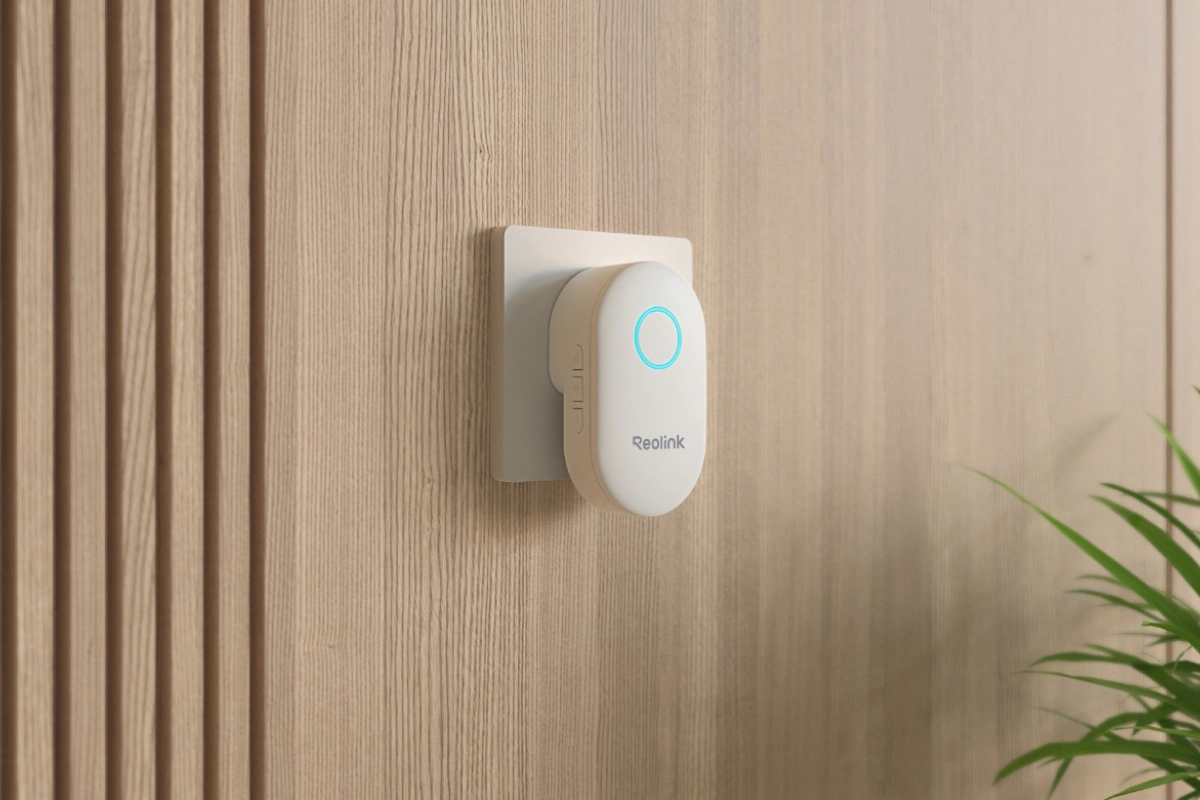
Wireless Plug-in Indoor Chime for Reolink Video Doorbells
Compatible with All Reolink Video Doorbells
10 Selectable Ringtones for Custom Alerts
5 Adjustable Volume Levels Including Mute
Direct AC Wall Plug-In Easy Installation
Reliable RF Wireless Connection for Alerts
LED Light Indicator for Visual Notifications
RM129.00Original price was: RM129.00.RM109.00Current price is: RM109.00.
Reolink Doorbell Chime
Doorbell Chime Video
4 Videos
Others Video
Disclaimer: The videos are intended for reference purposes only and are not guaranteed to be 100% accurate. Please refer to the actual product or contact us for verification.
A: The Reolink Doorbell Chime is an indoor plug-in wireless digital chime designed specifically to sound audible ringtone alerts inside your home whenever a visitor presses your Reolink Video Doorbell.
Which doorbells are compatible with the Reolink Chime?
A: The Reolink Chime is exclusively compatible with Reolink Video Doorbells (Including Reolink Video Doorbell PoE, Wi-Fi, and Battery models). It is not compatible with third-party video doorbells or traditional mechanical doorbell transformers.
What are the dimensions, casing material, and power input specifications of the chime?
A: The chime measures 96.6 mm (L) x 50.6 mm (W) x 58.7 mm (H) (55.6 mm width for AU versions) and is made of durable ABS+PC material. It plugs directly into standard wall power outlets operating at 100-240VAC, 50-60Hz.
What wireless transmission frequency does the chime use?
A: The Reolink Chime communicates with the Reolink Video Doorbell via an 868MHz Sub-1G wireless radio frequency signal with maximum RF power under 10dBm (EIRP), ensuring strong indoor signal penetration.
What items are included in the box with a standalone Reolink Chime?
A: The standalone package includes the Reolink Chime unit and the Quick Start or Operational Instructions guide. Doorbells sold as complete kits include a Reolink Chime in the box.
Ringtones, Volume & LED Indicators
How many ringtones are available on the Reolink Chime, and how do I change them?
A: The chime features 10 built-in selectable ringtones. You can cycle through the ringtones by pressing the physical Ringtone Button on the side of the chime or by selecting your preferred tone directly inside the Reolink App.
How do I adjust the volume level, and what volume levels are supported?
A: You can press the physical Volume Button on the side of the chime or adjust the volume bar inside the Reolink App. The chime offers 5 volume levels ranging from Level 0 (Mute) to Level 4 (0 to 100 dB: Mute, Low, Moderate, Loud, Very Loud).
What does Mute mode do on the Reolink Chime?
A: When set to Mute (Level 0), the chime silences all ringtone audio when the doorbell button is pressed, but the LED light ring on the front panel will still flash visually to signal a visitor.
What physical buttons and LED status indicators are on the chime body?
A: The chime features a circular Status Indicator LED on the front face, along with three side control buttons:
Setting Button: Used for pairing configuration.
Ringtone Button: Used to change audio chimes.
Volume Button: Used to adjust volume or execute a factory reset.
Can I customize ringtone settings remotely via the Reolink App?
A: Yes. When your Reolink Video Doorbell is connected to the network, you can remotely select chime ringtones, adjust volume levels, and change LED settings through the Reolink App from anywhere.
Setup, Installation & Powering
How is the Reolink Doorbell Chime powered and installed?
A: The chime features a built-in wall plug design. Installation is plug-and-play: simply plug the chime into any standard AC indoor power outlet (100-240V) near your living area.
Do doorbells that come in a kit need manual chime pairing?
A: No. Doorbells purchased as part of a kit come pre-paired with the included chime out of the box. Simply plug the chime into a power outlet and press the doorbell button to test the ring.
How do I manually pair a separately purchased Reolink Chime with my Video Doorbell?
A:
Plug the chime into an AC outlet.
Press and hold the Setting Button on the side of the chime until it beeps 3 times and the LED lights up blue.
Open the Reolink App, navigate to Doorbell Settings > Chime > Reolink Chime, tap Go to Pair, and press the physical button on your Video Doorbell to complete pairing.
Where is the best place to plug in the chime inside my house?
A: Plug the chime into a central wall outlet in an area where you frequently spend time (E.g., hallway, living room, or home office) within reasonable 868MHz RF signal range of the outdoor doorbell.
Does the Reolink Chime require batteries or charging cables?
A: No. The Reolink Chime draws continuous power directly from the indoor AC wall outlet. It does not contain internal batteries or require charging cables.
Multi-Device Pairing & Network Limits
How many Reolink Chimes can be paired with a single Reolink Video Doorbell?
A: A single Reolink Video Doorbell can be paired with up to 5 Reolink Chimes simultaneously, allowing you to place chimes across multiple floors or rooms in your home.
Can a single Reolink Chime be paired with multiple Reolink Video Doorbells?
A: No. Each Reolink Chime can only be paired with one Reolink Video Doorbell at a time.
What is the maximum wireless communication range between the doorbell and the chime?
A: The 868MHz wireless connection can cover typical residential distances up to 10-30 meters indoors, depending on the thickness and material of intervening walls and obstacles.
Does the Reolink Chime connect directly to home WiFi?
A: No. The chime does not connect directly to 2.4GHz or 5GHz WiFi networks. It uses a dedicated 868MHz RF connection to communicate directly with the Reolink Video Doorbell.
Will the chime still ring if my home WiFi or Internet connection goes down?
A: Yes. Because the chime communicates directly with the video doorbell over a local 868MHz RF signal, it will continue to ring when the doorbell button is pressed even if your home WiFi or Internet connection is disconnected.
App Controls, Smart Home Integration & Customization
How do I access and manage Chime settings inside the Reolink App?
A: Open the Reolink App, select your Reolink Video Doorbell, tap the Settings (Gear) icon, select Chime, and choose Reolink Chime to adjust volume, switch ringtones, or manage paired chimes.
Can I upload custom audio files or MP3 ringtones to the chime?
A: No. The chime plays preset local audio files and supports the 10 built-in ringtones stored on its hardware. Custom MP3 files cannot be uploaded to the chime.
Is the Reolink Chime compatible with smart home voice assistants like Alexa or Google Assistant?
A: The chime itself operates via local RF signals and does not connect to voice assistants. However, your Reolink Video Doorbell can link to Google Assistant or Amazon Alexa to announce visitor alerts through smart displays or Echo or Google devices.
Can I temporarily disable chime notifications without unplugging it?
A: Yes. You can set the chime to Mute mode either by pressing the physical Volume Button until muted or by selecting the Mute volume level in the Reolink App.
Can I unpair or remove a chime using the Reolink App?
A: Yes, you can manage or delete paired chimes directly under the Chime settings menu inside the Reolink App.
Troubleshooting, Factory Reset & Maintenance
What should I check if the Reolink Chime fails to ring when the doorbell button is pressed?
A:
Ensure the chime is securely plugged into an active AC outlet.
Verify that the chime volume is not set to Mute.
Check if the chime is within 868MHz RF range of the doorbell.
Re-pair the chime with the doorbell via the Reolink App settings.
How do I perform a factory reset on the Reolink Chime?
A:
Unplug the chime from the power outlet.
Press and hold the physical Volume Button.
Plug the chime back into the power outlet while continuing to hold the Volume Button.
Keep holding until you hear 10 slow beeps followed by 4 fast beeps, indicating the reset is complete.
What do the different beep sounds mean when adjusting volume or pairing?
A:
3 Beeps + Blue LED: Chime has entered pairing mode.
2 Beeps: Reached the minimum (Low) or maximum (Very Loud) volume limit.
What are the operating temperature and environmental requirements for the chime?
A: The Reolink Chime is designed for indoor use, operating in temperatures ranging from -20°C to 55°C (-4°F to 131°F) and relative humidity levels between 10% and 90%.
What warranty and technical support options come with the Reolink Chime?
A: The Reolink Chime includes a 2-year limited warranty when purchased through official or authorized sales channels, backed by online documentation and technical ticket support via https://reolinkmalaysia.com.my/support.
Reviews
There are no reviews yet